OpenClaw vs AutoClaw: Buy the Metered Car or Build on the Engine
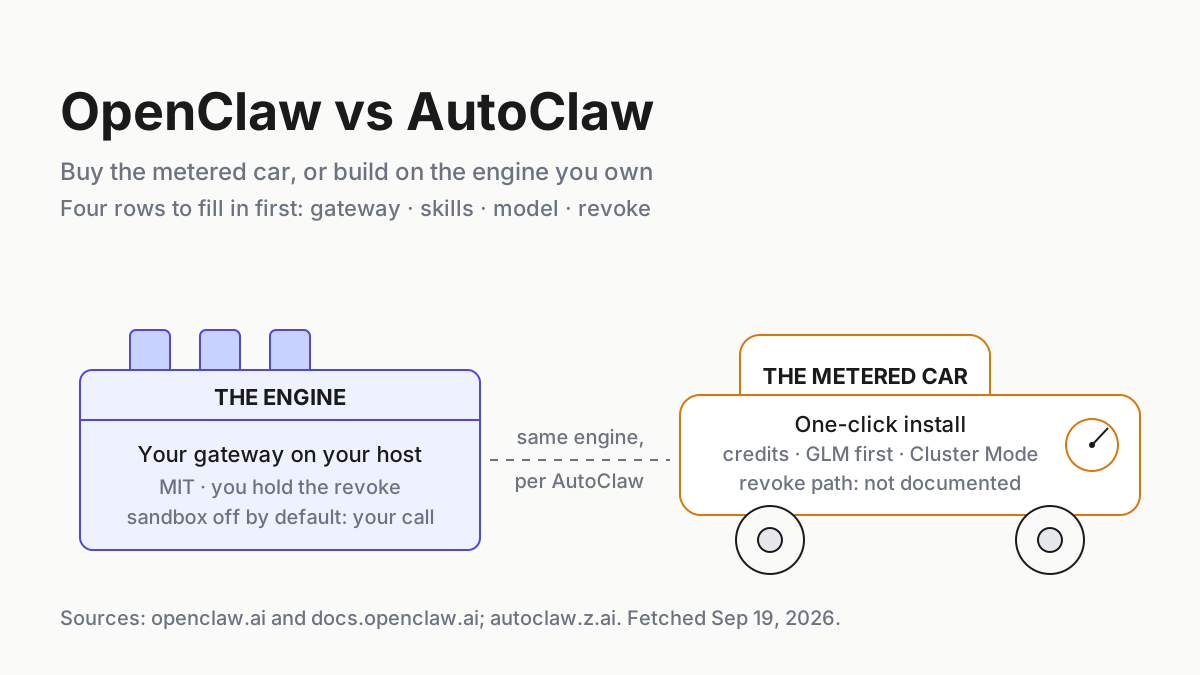
OpenClaw vs AutoClaw is an ownership question, not a price one. Decide who owns the gateway, skills, model and revoke path before a chat bot holds prod tokens.

Go deeper. Build your own.
By Friday the bot in your team’s Telegram group can read the shared drive, run shell commands and publish to Vercel, and the question of who owns the process behind it was settled on Monday by which installer you clicked. That is the whole openclaw vs autoclaw decision. It is not a pricing question, because one of the two products costs nothing and the other has no price list; it is an ownership question. Who owns the gateway, who owns the skills, who owns the model, and who can revoke all three at 2 a.m. without asking a vendor.
OpenClaw is the engine. It is MIT-licensed, stewarded since Jul 8, 2026 by an independent 501(c)(3) foundation, and it runs as a gateway on a host you control. AutoClaw is the metered car built around that engine, by its own account: a one-click desktop install from Z.ai with daily credits, GLM models first, IM bots in a couple of minutes, and a Cluster Mode that fans one request out to as many roles as it decides the job needs.
The move this piece leaves you with is a one-page ownership sheet per digital employee, filled in before any bot holds a production token. Four rows: gateway, skills, model, revoke. Whichever product you pick, the rows you cannot fill in are the rows you are trusting someone else to fill in for you.
Sep 16: the engine publishes its fix count; the car still has no price page
On Sep 16, 2026, the OpenClaw Security Team posted a short note on where to find OpenClaw security updates, and the line that matters is a count: “Since January, 722 fixes have been published. Fourteen reports resulted in confirmed critical vulnerabilities; all of them had been fixed and disclosed.” The same post mentions an open dataset of more than 67,000 ClawHub skill scans and ongoing install blocking for malicious or quarantined skills. That is what a security record looks like when the project has nothing to sell you.
The governance behind it is two months old. The Foundation announcement by Dave Morin and Peter Steinberger on Jul 8, 2026 made OpenClaw a 501(c)(3), and the homepage now states the terms plainly: “OpenClaw is stewarded by the OpenClaw Foundation, an independent US 501(c)(3) non-profit. The Foundation employs the core team, signs every release, and keeps the whole product MIT licensed. There is no enterprise edition and no paid version.” On what donors such as OpenAI, Amazon and Red Hat get, the page is careful: “Donors fund the Foundation. They do not own, control, or direct the project, and no lab’s model is privileged in the code.”
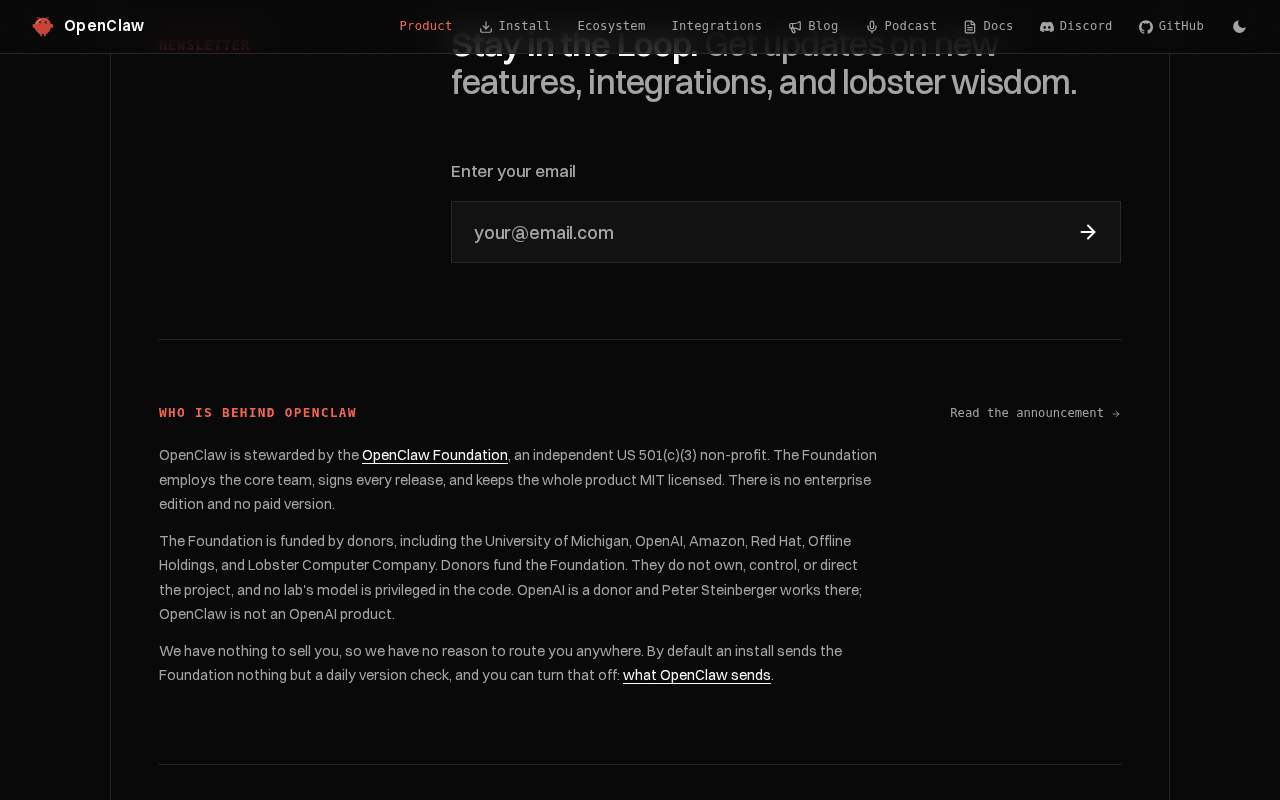 Screenshot: openclaw.ai, “OpenClaw — Open-Source AI Assistant” (homepage, Who is behind OpenClaw section, undated), captured Sep 19, 2026.
AutoClaw’s side of the story is told only by AutoClaw. Its May 29, 2026 explainer says “AutoClaw is an AI digital employee built on the OpenClaw open-source framework,” and the changelog entry for v1.11.0 on Jul 6, 2026 reads “Upgraded the OpenClaw kernel to version 6.8.” Upstream OpenClaw releases carry calendar versions (v2026.9.5 is current for macOS and Linux), so 6.8 maps to no release you can look up. OpenClaw’s homepage, README, security docs and release index do not mention AutoClaw; on the OpenClaw side, Z.ai appears only as a model provider. Treat the lineage as AutoClaw’s claim, which is not the same as doubting it.
The metering is equally one-sided. The AutoClaw homepage FAQ says “AutoClaw offers free basic usage and daily free credits” and “Paid plans are available for heavier usage,” but the nav’s Choose your plan button opens a Coming soon modal. New users are offered 100 million GLM-5.3-Flash tokens described as worth $12, and GLM Coding Plan subscribers get monthly bonus credits (those Lite, Pro and Max tiers belong to the GLM Coding Plan, not to AutoClaw). No credit-to-token rate is published anywhere on the site.
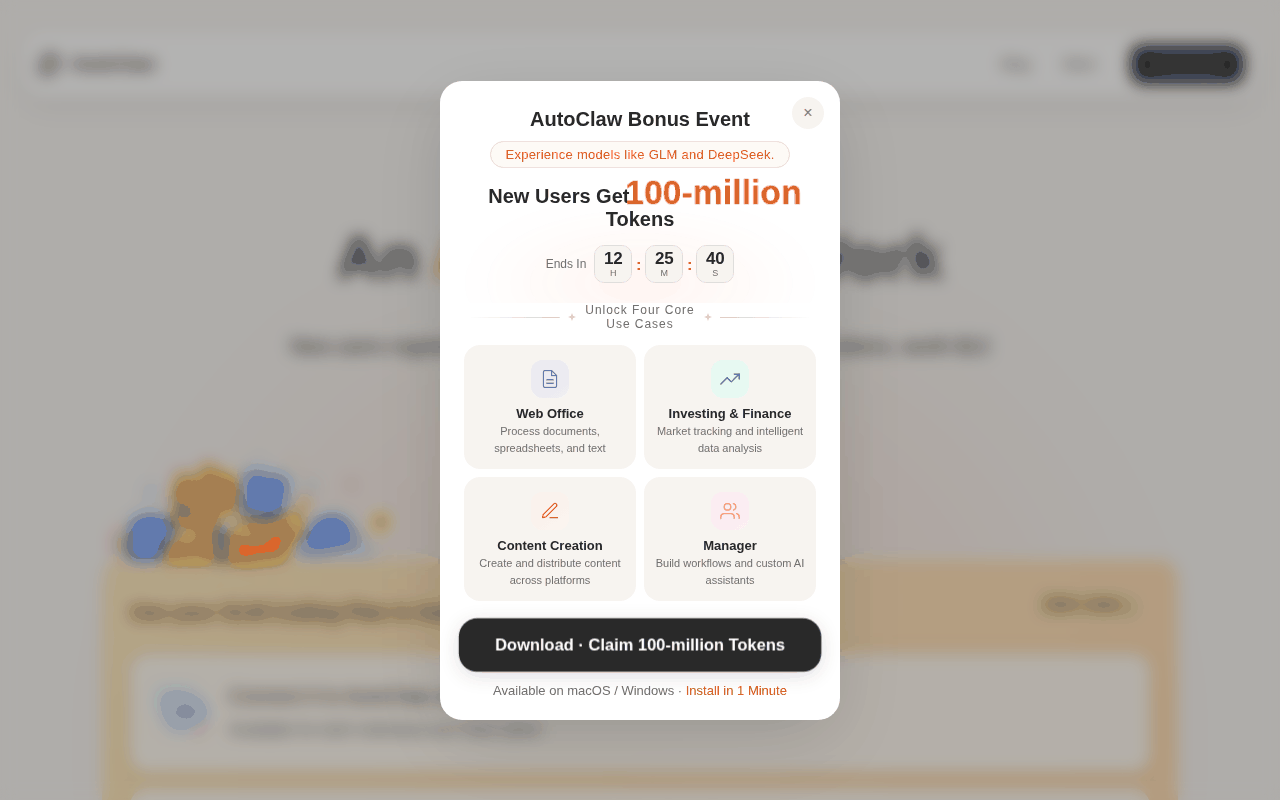 Screenshot: autoclaw.z.ai, “AutoClaw - Z.ai’s Official AI Agent | GLM-5.3-Flash Now Live” (homepage with the new-user token modal, undated), captured Sep 19, 2026.
A chat message is now a command with file, shell and browser reach
AutoClaw’s explainer describes the product in one sentence: “Tell it what to do in the chat box, and it automatically operates browsers, reads and writes files, calls APIs, runs scripts, and delivers the results to you.” OpenClaw’s capability card says the same thing with a choice attached: “Full access or sandboxed—your choice.” Either way, a message in a group chat is now an instruction that lands on a laptop with your credentials on it, and the sandbox is a suggestion until you configure it.
Both products can do roughly the same things to the same machine. What differs is who holds the config, who signs the updates, who meters the work, and who can pull the plug. Agents are privileged users; pick the one whose privileges you can see.
Step 1: Draw the trust boundary before you compare a single feature
OpenClaw’s security doc gives you the rule to borrow whichever product you choose: “One trust boundary per gateway.” The page spells out who fits inside it, “a single operator, or a team whose members trust each other,” and who does not: “OpenClaw is not a hostile multi-tenant security boundary for mutually adversarial users sharing one agent or gateway.” For anything mixed, the instruction is to “split trust boundaries: separate gateway + credentials, ideally separate OS users or hosts.”
AutoClaw’s docs do not say. The FAQ tells you that “teams should configure access according to their own security policies,” and the multi-agent post describes agents with separate personality, memory and workspace on one computer, which is memory isolation rather than a security boundary. On the car, the boundary is the laptop and the OS user it runs as, until you draw a smaller one yourself.
Write the boundary down before Step 2, in one of three shapes:
- Solo. One person, one host, one gateway or one app. Every channel bot talks to the same agent.
- Trusting team. Colleagues who already share repo access. One gateway, shared sessions, group chats behind a mention gate.
- Mixed trust. A family WhatsApp group with a cousin in it, a public Discord, a customer channel. This shape gets its own gateway, credentials and ideally its own OS user, or it gets no bot at all. The sibling piece on IM channel allowlists for digital employees is the runbook for that row.
Step 2: The OpenClaw vs AutoClaw ownership table: gateway, skills, model, revoke
This is the decision. Every cell below comes from the vendors’ own pages as of Sep 19, 2026, and the cells that read not documented are the point.
| Row | OpenClaw (build on the engine) | AutoClaw (buy the metered car) |
|---|---|---|
| Who owns the gateway | You. README: “The Gateway is the local control plane for sessions, tools, events, and channel connections.” Binds to loopback on a regular host install. | Z.ai’s app owns whatever runs inside it. The changelog mentions a Gateway connection fix (v1.16.2, Aug 10, 2026) and says nothing else about it. |
| Who owns the skills | You install from ClawHub or write your own; the Sep 16 post describes skill scanning and install blocking for quarantined skills. | 50+ built-in skills ship with the app; Hermes proposes new skills after complex tasks and you approve each one. No scanning or allowlist story is published. |
| Who owns the model | You. Models and agent harnesses are plugins; Z.ai is one provider among many, reached with your own API key. | GLM first, with DeepSeek switching; billed in credits whose exchange rate is not published. |
| Who owns the data path | Your host. README: a daily version check by default, anonymous statistics opt-in, update.checkOnStart: false disables both. |
Marketing says data stays on your machine; the privacy policy says text, files and code submitted through conversation are collected, and may be used to train and improve models. |
| Who can revoke | You: stop the gateway, rotate a channel credential, openclaw security audit to confirm. Incident-response and exposure runbooks exist in the docs. |
Not documented for bots or connectors. The only revoke language on the site is about OS permissions, which you disable in system settings. |
| Security record | 722 fixes since January, 14 confirmed criticals, all disclosed (Sep 16, 2026). | No security model published. |
| Default posture | Sandboxing off by default; DM senders paired by default; group access allowlisted behind a mention gate. | Not documented. |
| Price | None. “No subscription. No hosted tier. No token.” | Free basic usage plus daily credits; paid plans described but unpriced. |
Read the table by column and it reads as engine versus car. Read it by row and one thing stands out: the rows where AutoClaw’s answer is not documented are exactly the rows you will need at 2 a.m. Buying the car makes those rows your job, and the rest of this runbook is that job.
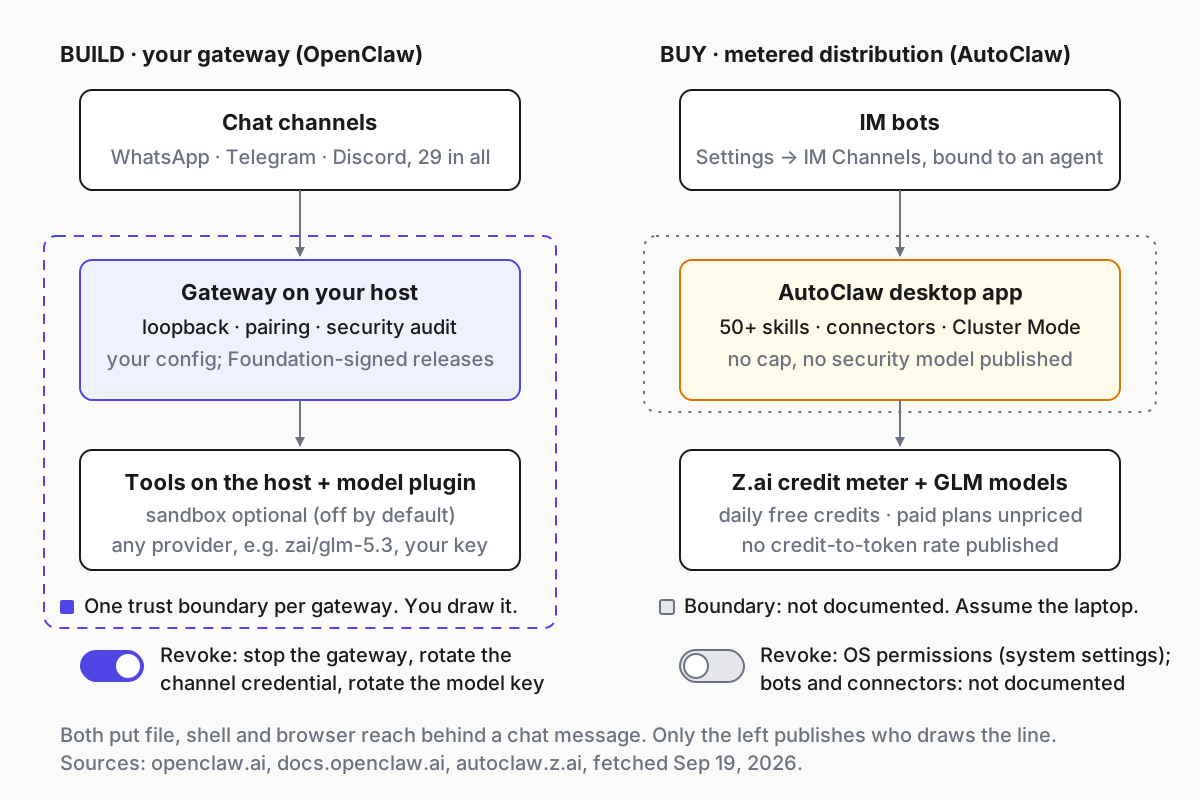 Left, the engine: one boundary per gateway, and you draw it. Right, the car: the boundary is wherever the laptop ends, because the docs do not draw one.
Step 3: The build path, and what you inherit with the engine
Building means you run the gateway, so the setup cost is real. The trade is that you inherit a published record instead of a promise.
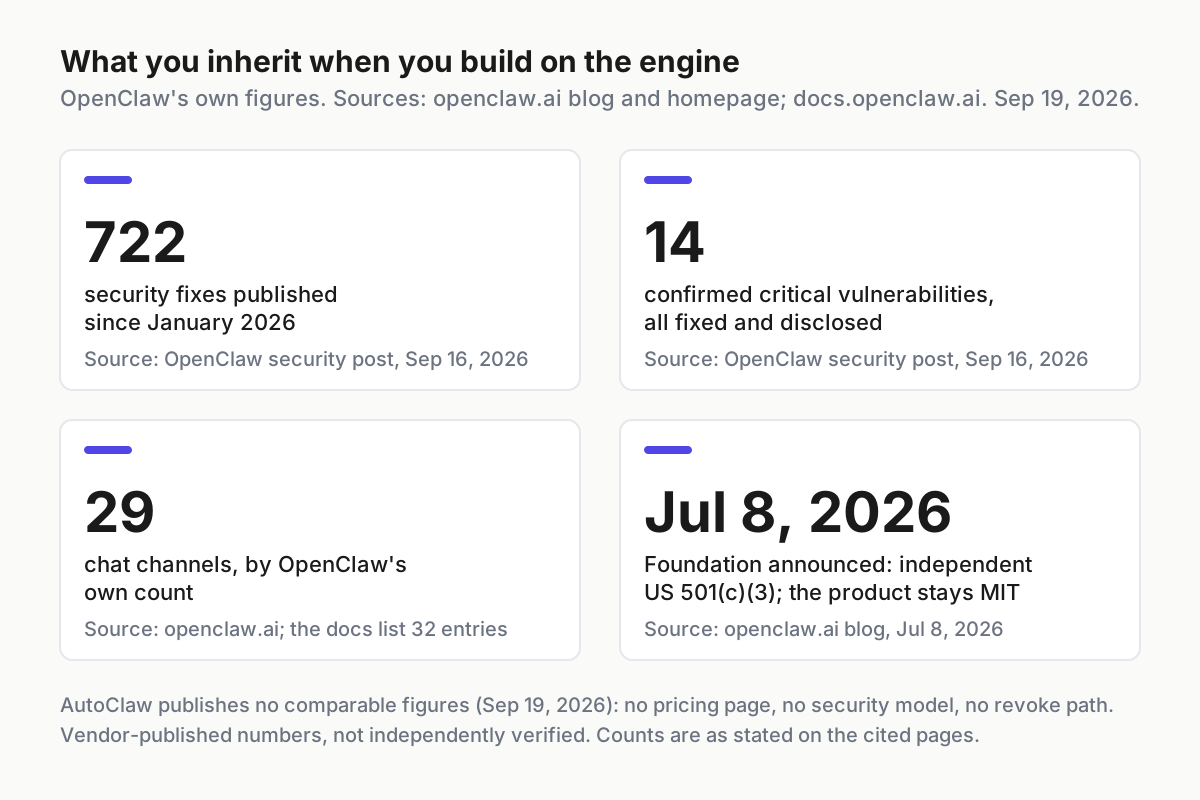 What the engine publishes about itself. AutoClaw publishes no comparable figures as of Sep 19, 2026.
Run this checklist on a fresh host and do not skip the fourth item because the first three went well.
- Install from the Foundation’s own script or npm, then pin your update channel:
openclaw update --channel stable. The Foundation signs every release; the dev channel is not for the host that holds prod tokens. - Leave the gateway on loopback and read the exposure runbook before you change that. A regular host install binds to loopback and most channels answer an unknown DM sender with a pairing code.
- Pair senders one at a time. The README says “Treat inbound messages as untrusted input. DM-capable channels pair unknown senders by default,” and you approve each with
openclaw pairing approve <channel> <code>. A paired sender is a person who can type at your shell. - Decide on sandboxing, in writing. The README is blunt: “Tools run on the host for the main session unless you configure sandboxing.” Docker, Podman, SSH and other backends exist. If the gateway holds a prod token, the main session does not run unsandboxed on the host, and you write down why if it does.
- Run
openclaw security auditafter every config change and paste the output into the ownership sheet. The security doc calls it the one command that tells you if you have drifted from the defaults, so keep each run’s output. - Restrict cross-channel sends if your boundary needs it. The same doc warns that “Agents with message-tool access can send across conversations and channel providers by default.” A bot that can read a private DM and post to a group is a leak waiting for a prompt.
- Bring your own model, including GLM. OpenClaw’s Z.ai provider page says “OpenClaw uses the zai provider with a Z.AI API key” and that GLM models use refs such as
zai/glm-5.3. You can put the same engine behind the same models on your own gateway.
# ownership.yaml (illustrative shape); one per digital employee, kept beside the gateway config
employee: ops-assistant
boundary: trusting-team            # solo | trusting-team | mixed-trust
gateway:
  host: laptop-03
  bind: loopback
  sandbox: docker                  # written down, even when the answer is "none"
  update_channel: stable
  last_security_audit: 2026-09-22
channels:
  telegram: { paired_senders: 3, groups: 1, mention_gate: true }
  whatsapp: { paired_senders: 1, groups: 0 }
model: { provider: zai, ref: zai/glm-5.3, key_owner: me }
revoke:
  order: [rotate-channel-credential, stop-gateway, rotate-model-key]
  last_drill: 2026-09-22
  time_to_silence_min: 4
Step 4: The buy path, and what the car does not tell you
Buying means the install is a minute, the IM integration is a couple more, and every undocumented row from Step 2 is yours to reconstruct from the outside. Do it on day one.
- Inventory every bot and the agent it binds to. Setup lives at Settings → IM Channels; you pick the platform, add an account and authorize the credentials. The multi-agent post adds the line that decides your blast radius: “The newly created bot can be bound to an existing Agent (shared memory) or to a new Agent (independent memory).” A bot bound to the agent that holds your deploy context shares its memory.
- List the connectors. Two are named on the whole site, Cloudflare and Vercel, added Aug 10, 2026. Scope, auth and removal are not described, so the weekly connector inventory is a check you run by hand.
- Treat Cluster Mode as unbounded until proven otherwise. Formation is automatic, and broad research “may involve 18 roles coordinating.” No cap, per-role cost, timeout or abort path is documented, and model restrictions on Cluster Mode were removed on Aug 14, 2026. The credit balance is the only ceiling you have, so keep it small on any machine with real tokens.
- Read the privacy policy next to the FAQ. The FAQ says AI tasks send only the task description and model-call context; the privacy policy says the collected material includes text, files, configuration parameters, shell commands and code submitted through conversation, with model training among the stated bases. Decide which sentence governs the files you point the agent at.
- Find the revoke path by testing it. The docs describe adding a bot, not removing one. Before the bot joins a real group, add a throwaway bot, remove it, rotate its token at the platform and confirm the group goes silent. Write the steps down, because nobody did it for you.
- Meter the credits like a bill. Model consumption statistics are visible on hover since Aug 4, 2026, the only cost surface described. Screenshot it weekly until you know what a normal day costs, because there is no exchange rate to compute it from. The credit-versus-token dialect is its own piece; the number lands in the digital-employee inventory beside the bots and connectors.
Step 5: Run the revoke drill on both, on a Tuesday with nothing at stake
An ownership sheet with an untested revoke row is a wish. Run the drill on both the same afternoon, with a stopwatch, and record the time to silence.
# Illustrative drill; the first two commands are OpenClaw's, the rest are yours
openclaw security audit                      # baseline before you break anything
openclaw pairing approve telegram 4Q7X       # pair a throwaway sender so there is something to revoke
# 1. rotate the bot token at the IM platform         -> the bot must stop answering within a minute
# 2. stop the gateway process (or quit the app)      -> the group must stay silent
# 3. rotate the model provider key                   -> any orphaned worker must fail closed
# 4. send one message from the paired sender         -> expected result: nothing
echo "time_to_silence_min=$((SECONDS/60))" >> ownership.log
Two failure signals to look for. If the group keeps getting replies after step 2, something other than the process you stopped is holding the channel, and you have found a second gateway. If step 3 produces an error in a chat you were not watching, the agent has cross-channel send enabled and you have found where it posts.
Five OpenClaw vs AutoClaw failure modes, and the signal for each
The mixed-trust group on one gateway. A cousin, a contractor or a stranger in a group the bot listens to. Signal: a sender you did not pair gets a reply. On the engine this is a pairing or allowlist misconfiguration; on the car you cannot tell whether it is a misconfiguration or the default, because no gate is documented.
The version you cannot map. AutoClaw’s kernel is 6.8 by its own numbering and upstream ships v2026.9.x, so you cannot tell whether the 14 criticals from the Sep 16 post are fixed in the build on your laptop. Signal: no changelog entry since Aug 27, 2026 while upstream keeps shipping. Response: assume unfixed on any host with prod tokens.
Credits as the only cap. Cluster Mode picks its own formation, and the meter is a balance rather than a rate. Signal: the balance drops faster than your usage explains and the progress panel shows roles you did not ask for. Response: a per-machine credit ceiling you top up by hand, and a bot that cannot reach a shared agent.
Sandboxing off, by default, on the engine. Signal: no sandbox backend in the config, which per the README means the main session’s tools run on the host, on a machine that also holds credentials. Response: a sandbox backend, or a second gateway for the work that needs the host.
The data path you assumed. Marketing said local; the policy said collected. Signal: you cannot answer what left the machine last week. Response: on the car, keep the agent’s workspace away from anything you would not paste into a vendor chat; on the engine, model traffic goes to the provider you chose, and the README’s only default call home is a daily version check.
Both are fleet members; the desk still needs one view of them
Whichever column you pick, the digital employee joins a fleet that already has a Claude Code session, a Codex run and two CLIs on the same laptop, and the layer that runs that fleet does not care which installer you clicked. It needs an inventory row, a kill path that works without the vendor, a meter it can read, and the trust boundary written down. That is the case for the open gateway over the vendor suite and for treating the gateway as a control plane, and it is why a multi-agent command center is mostly an ownership sheet with a stop button attached.
Buy the car if your boundary is solo, your tokens are disposable and your time is not. Build on the engine the moment a bot can touch something you would have to explain. Either way, fill in the four rows first.
FAQ
Is AutoClaw the same as OpenClaw?
No. AutoClaw describes itself as built on the OpenClaw open-source framework and packages it as a one-click desktop app from Z.ai with credits, GLM models and Cluster Mode. OpenClaw’s own pages do not mention AutoClaw, and its kernel version 6.8 maps to no upstream OpenClaw release.
Does OpenClaw have a paid version or a hosted tier?
No. The homepage states there is no enterprise edition and no paid version, and the Foundation, an independent US 501(c)(3) since Jul 8, 2026, employs the core team and signs every release. You run the gateway yourself and pay only your model provider.
Can I run GLM models on OpenClaw without AutoClaw?
Yes. OpenClaw’s provider docs describe a zai provider that takes a Z.ai API key, with model refs such as zai/glm-5.3. The model alone does not decide the choice; the one-click install, the credit meter and Cluster Mode are what AutoClaw adds on top of it.
Sources
- OpenClaw: Where to find OpenClaw security updates — OpenClaw Security Team, Sep 16, 2026; 722 fixes, 14 confirmed criticals
- OpenClaw: Introducing the OpenClaw Foundation — Dave Morin and Peter Steinberger, Jul 8, 2026
- OpenClaw homepage — Foundation, MIT license, no paid version, 29 channels, full access or sandboxed
- openclaw/openclaw README — gateway as control plane, pairing, tools on host unless sandboxed, telemetry defaults
- OpenClaw docs: Gateway security — one trust boundary per gateway, conservative defaults, cross-provider messaging
- OpenClaw docs: Z.AI provider — zai provider, GLM model refs
- AutoClaw: What is AutoClaw — May 29, 2026; built on the OpenClaw open-source framework
- AutoClaw changelog — v1.11.0 (Jul 6, 2026) kernel 6.8; v1.16.2 (Aug 10) connectors; v1.17.2 (Aug 14) Cluster Mode restrictions removed; v1.17.8 (Aug 27)
- AutoClaw homepage — FAQ on credits and security, GLM Coding Plan tiers, Choose your plan modal
- AutoClaw privacy policy — effective Mar 25, 2026; collection and training clauses