Local AI Agent vs Cloud Project: Digital Employees on the Desk, Threads in the Cloud, and No Sync Fantasy
Local AI agent vs cloud project: AutoClaw, OpenClaw and Kimi Work beside Cursor and Claude Code Projects; one identity, one kill switch, provenance per host.

Go deeper. Build your own.
Three agents are working for you right now, and one of them is on a machine you cannot unplug. AutoClaw is running a Cluster Mode job on the laptop. Kimi Work has a scheduled task that fires only while its app is open. A Claude Code project you briefed on Friday is running threads in a sandbox Anthropic owns, on branches it will push whether or not you are awake. The local AI agent vs cloud decision turns on three dull questions: which one you can stop, which one keeps the transcript, and which one spends money while you are not looking.
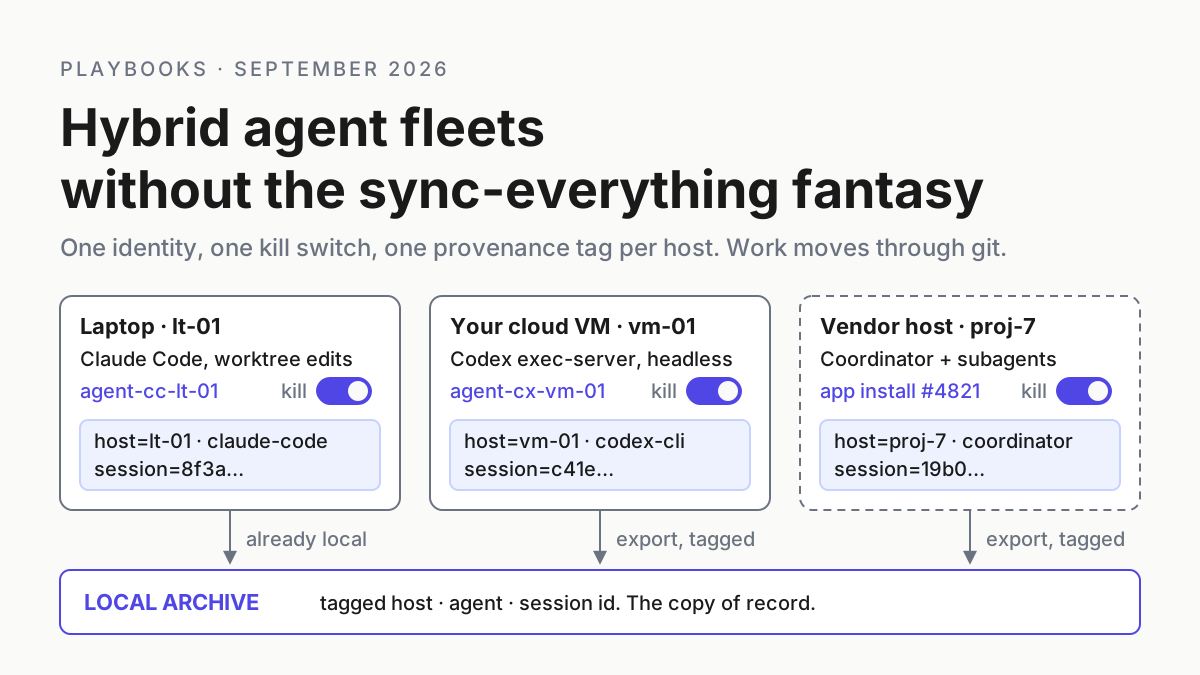
The earlier hybrid fleet runbook covered a laptop, a rented VM and a vendor’s computer. September changed the cast on both ends. The desktop side now ships agents that act on your laptop: AutoClaw, which calls itself an AI digital employee, the OpenClaw engine AutoClaw says it is built on, and Kimi Work. The cloud side now ships coordinators: Cursor Projects on Sep 10 and Claude Code Projects on Sep 17, each spawning workers on computers you never log into. The fantasy, unchanged, is that something syncs all of it into one workspace you trust by default.
The disciplined version is smaller. By Tuesday you should have a what-lives-where table for code, secrets, transcripts, approvals and the meter; one identity per host and per digital employee; a provenance tag on every transcript before it leaves its host; and one kill switch per host with the vendor’s real stop semantics written beside it. Where a tray companion on the laptop fits, and where it does not, is stated near the end.
Local AI agent vs cloud project, September 2026: who is on the roster
AutoClaw’s own description: “AutoClaw is an AI digital employee built on the OpenClaw open-source framework.” It installs on Windows 10 and later and on macOS, with an internet connection “required for model calls” (AutoClaw explainer; AutoClaw download). The homepage FAQ draws the boundary this way: “AutoClaw is a locally installed desktop app. AI tasks only send the necessary task description and model-call context. For private files or enterprise accounts, teams should configure access according to their own security policies.” The explainer goes further: “Your work data, chat records, and file contents—all stay on your own machine.” The privacy policy, effective Mar 25, 2026, says: “we will collect the text, files (including but not limited to uploads and inputs you provide in the form of text, images, audio, video, configuration parameters, shell commands, and similar formats), and code submitted to us through conversation, in order to provide you with content generation and AI-assisted operation services.” and lists among its legitimate interests “such as when we train and improve our models.” (AutoClaw privacy policy). Both texts are the vendor’s; this article puts them side by side and draws no conclusion. The inventory of the whole product is the AutoClaw digital-employee inventory.
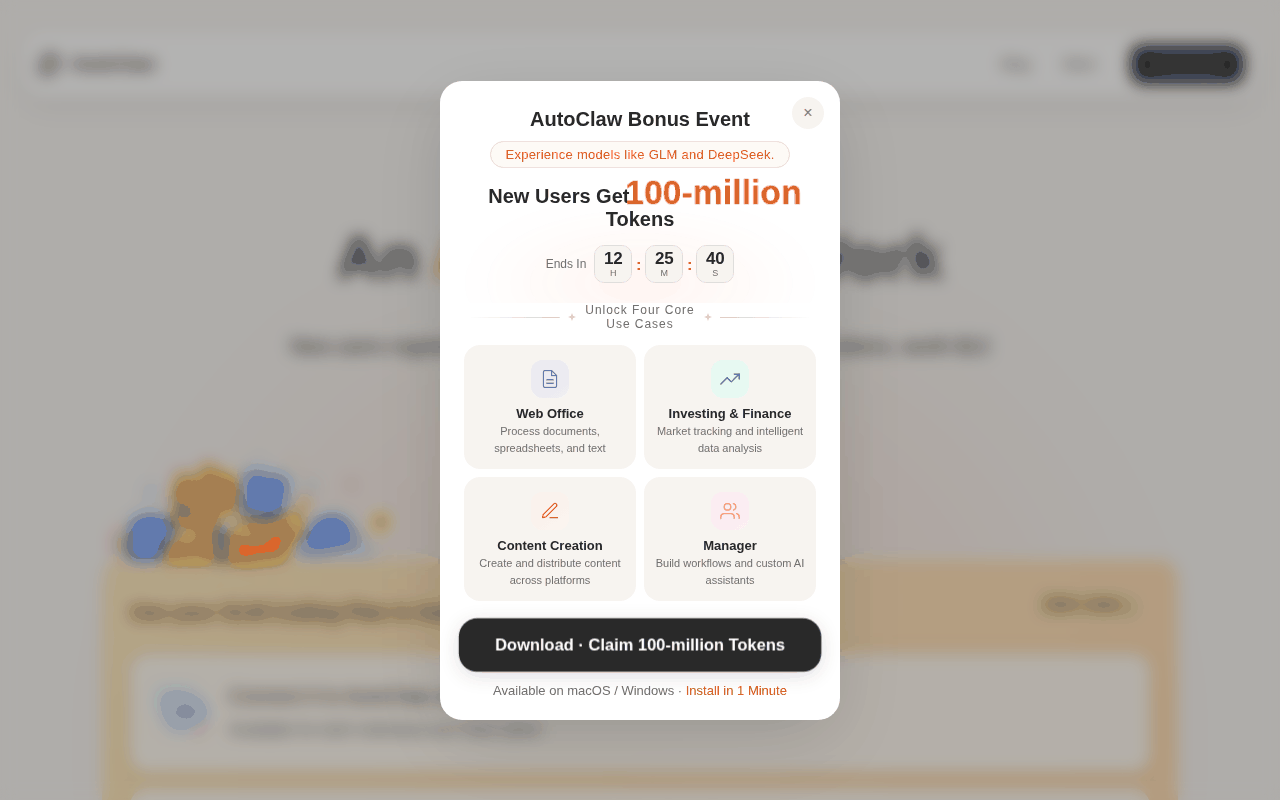 Screenshot: AutoClaw, “AutoClaw - Z.ai’s Official AI Agent | GLM-5.3-Flash Now Live” (undated), captured Sep 19, 2026.
OpenClaw, the engine, is local by architecture. Its README: “The Gateway is the local control plane for sessions, tools, events, and channel connections.” and “Tools run on the host for the main session unless you configure sandboxing.” Telemetry, in the README’s words: “by default OpenClaw itself phones home for nothing but a daily version check, anonymous feature statistics are opt-in, and update.checkOnStart: false disables both” (OpenClaw on GitHub). The security docs add the rule that matters for hosts: “One trust boundary per gateway.” (OpenClaw gateway security). Whether you run the engine or the packaged car is the OpenClaw versus AutoClaw decision.
Kimi Work is “a general-purpose local Agent for knowledge workers, available in the “Work” mode of the Kimi desktop client (Mac / Windows)“, launched Jun 3, 2026 and in beta (Kimi Work overview). Its FAQ is the most honest sentence any of these vendors wrote about locality: “On Kimi Work desktop, scheduled tasks run locally and only execute while the app is open. Triggers missed while your computer is asleep or shut down, or while the app is closed, are not run retroactively the next time it opens.” (Kimi Work FAQ). Release 3.2.5 on Sep 4 added “remote control: control Kimi Work on your desktop from your phone”, and 3.2.6 on Sep 7 says “Users will now be asked to confirm any still-running scheduled tasks before quitting the app” (Kimi Work release notes). The trust-tier argument for those tasks is the widget scheduled-tasks piece.
Cursor Projects shipped Sep 10, 2026. “A Project runs on its own computer in the cloud, so closing your laptop doesn’t stop it.” and, the line that makes it hybrid on day one, “When something needs testing on your machine, the coordinator starts a local agent to run it there.” It “isn’t available on Enterprise plans” and not with Privacy Mode (Legacy), “because Projects run on Cloud Agents, which store code in the cloud while they run” (Cursor Projects docs). The Cursor Projects versus tray ownership table is the full treatment.
Claude Code Projects, redesigned Sep 17, 2026, is cloud-only today. “Under the hood, each thread is a Claude Code cloud session working on its own branch and copy of the repo.” “Projects can run several threads at once, and each one is a full Claude Code session. Because of this, projects can reach usage limits faster.” And: “Threads run in the cloud today; running on your machine alongside your local tools and code and behind your network is coming very soon.” The docs are plainer: “A local session can’t be part of a project.” (Claude blog; Claude Code docs). The coordinator’s own abort matrix is in Anthropic’s cloud coordinator piece.
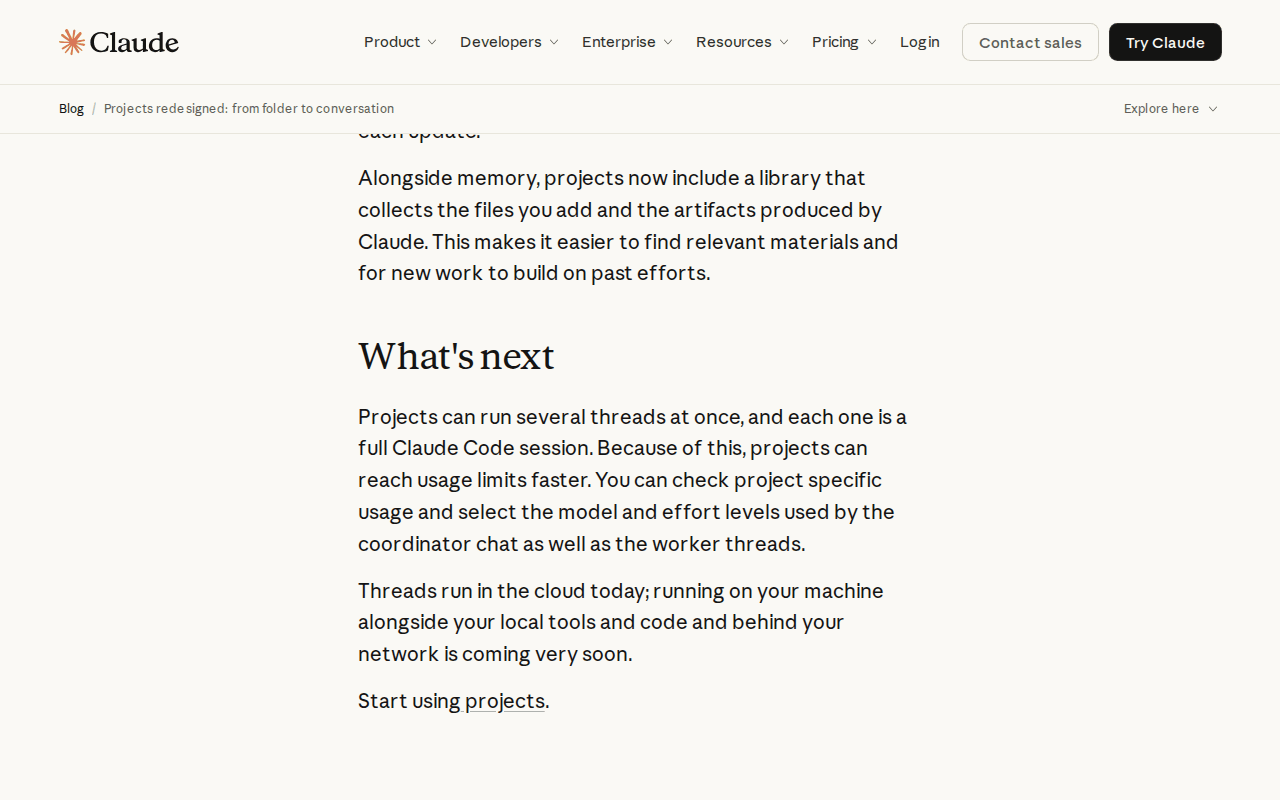 Screenshot: Claude blog, “Projects redesigned: from folder to conversation” (Sep 17, 2026), captured Sep 19, 2026.
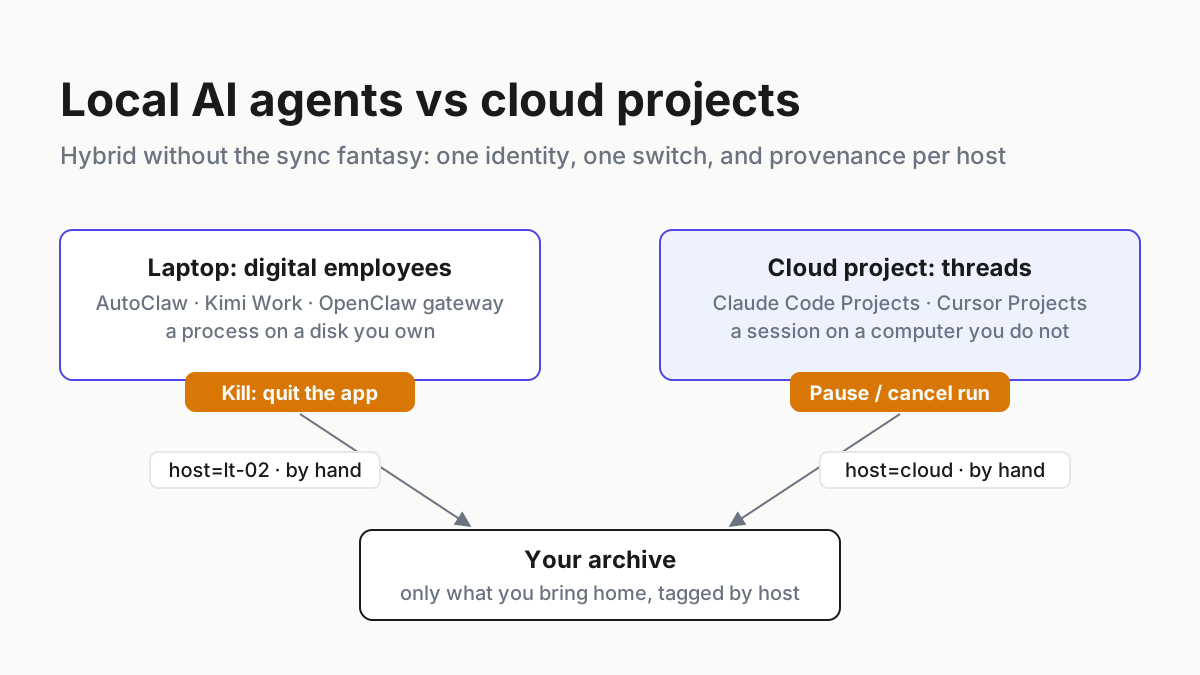
Five products, two shapes: a process on a disk you own, and a session on a computer you do not. The news stops here.
An agent that acts needs a host list, and every row needs its own switch
A chatbot never needed a host list because you typed the command yourself, on the machine you sat at. A digital employee runs shell commands on your laptop while you are in a meeting; a cloud thread pushes a branch from a sandbox you cannot reach. Every incident question, who ran this, where, with what credential, can it be stopped, now has a per-host answer, and the runbook exists to make those answers boring.
The hybrid runbook: where it lives, who it is, what it leaves behind, how it stops
Six steps. Every file shape below is illustrative; every quoted line is a vendor’s.
Step 1: Fill in the what-lives-where table before anything else
The table is the whole argument against sync. Five things matter in an incident, and each lives in a different place depending on the host. Draw it for your own fleet first; the version below is illustrative and uses the roster above.
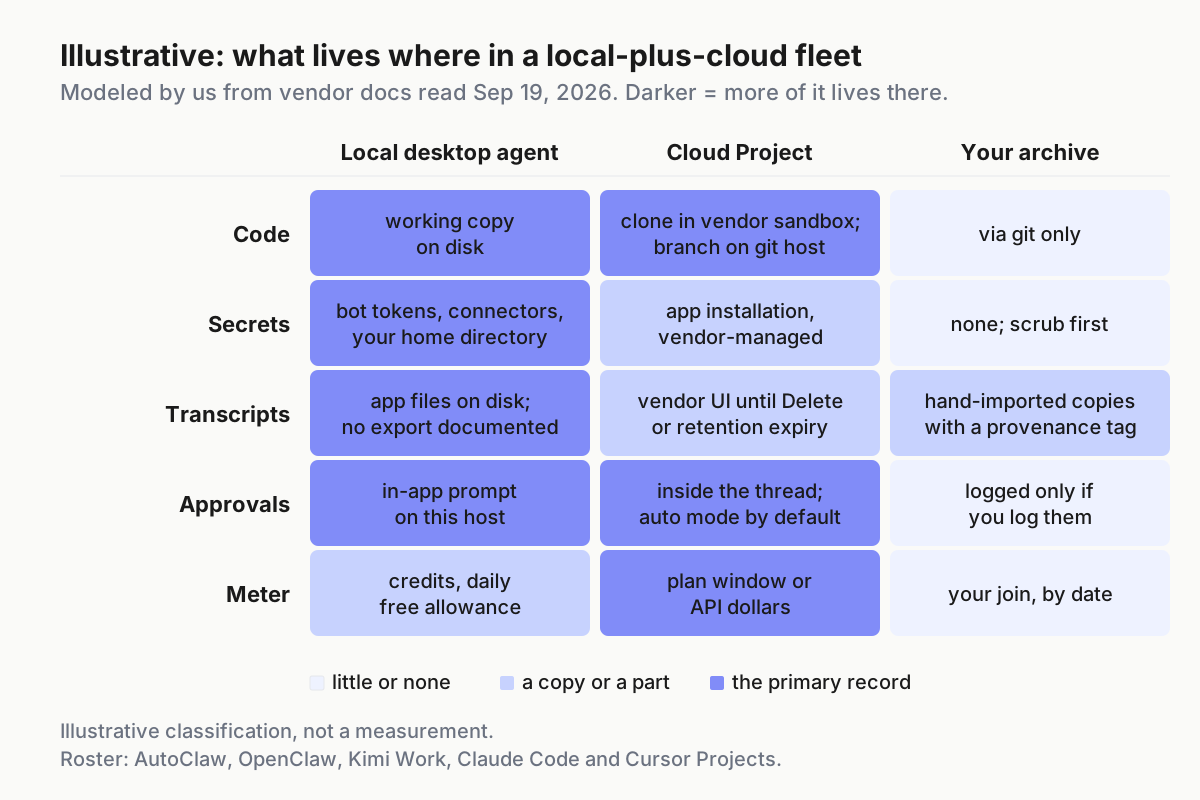 Illustrative. Darker means more of it lives there. The archive column is deliberately light: it holds only what you copy in, and secrets should never reach it.
Three readings. Code is the easy row, because both kinds of host push to the same git host, and git is the only sync you should trust. Secrets are the row people get wrong: a desktop digital employee holds IM bot tokens, connector credentials and whatever it reads from your home directory, on a host that is also your daily machine; a cloud project holds an app installation the vendor manages. Transcripts are the row that decides whether you can answer an auditor: local apps keep them on disk in their own formats, Anthropic keeps them in the project until you Delete it, and Cursor serves them through its Cloud MCP while run streams expire after a retention window.
Step 2: One identity per host and per digital employee, none borrowed from you
A hybrid fleet has more principals than it has hosts, because one laptop can run three digital employees and each can hold several bot tokens. AutoClaw binds bots to agents: “The newly created bot can be bound to an existing Agent (shared memory) or to a new Agent (independent memory).” (AutoClaw multi-agent post). OpenClaw’s gateway pairs unknown senders by default and wants one trust boundary per gateway. A Claude project belongs to one user and pushes through the Claude GitHub App. Cursor cloud agents work in a workspace repository under your team’s plan.
| Principal | Identity to issue | Where it is revoked | What the docs do not say |
|---|---|---|---|
| AutoClaw agent, per IM bot | one bot token per agent per channel, created under a service identity, never your personal account | at the IM platform; the multi-agent post documents adding a bot, not removing one | no revoke path for bots or connectors is documented |
| OpenClaw gateway | one gateway per trust boundary; a separate OS user or host for mixed trust, as the security docs advise | at the gateway (pairing) and at the channel | nothing about AutoClaw’s packaging |
| Kimi Work | plugin authorizations reviewed per plugin before first use, as Kimi’s own guide advises | on the plugin’s detail page (connection management since 3.2.6) | per-plan concurrency for widget tasks, credit cost per run |
| Claude Code project | the Claude GitHub App installation, scoped to the project’s repositories | at GitHub, without touching your login | what a running thread does when it loses push access |
| Cursor cloud agent | the repository connection your cloud agents use; team admins can disable Cursor Cloud MCP | in team settings and at the git host | permission-prompt model for Projects |
Name every one agent-<product>-<host>-<nn>. When agent-autoclaw-lt-02 appears in a log you already know the product, the host and the switch. The fuller identity table, with TTLs and instance roles, is in the earlier hybrid piece; this step is the digital-employee delta.
Step 3: Tag every transcript with its host before it leaves
Each product keeps its own record, in its own place, with its own lifetime. Kimi shows “the 10 most recent runs (run time and status)” per live widget task and nothing older (Kimi dashboard help). AutoClaw says chat records stay on your machine and documents no export. Anthropic lets you read a thread transcript in the Overview but “thread transcripts don’t have the share option other cloud sessions have”, and Delete removes them. Cursor exposes transcripts through Cursor Cloud MCP, with batch-fetch-details handling “up to 50 runs per batch”, and warns that a run stream “may return 410 stream_expired” once its retention window passes (Cursor Cloud Agents API).
None of those records says which host it came from once it lands in your archive. So the archive’s rule is that nothing enters without a header, and the header is written on the host that produced it:
# illustrative: provenance.yaml, one per imported transcript
host: lt-02                      # your inventory name, not the vendor's
host_kind: laptop                # laptop | cloud-project | cloud-agent
product: autoclaw                # autoclaw | openclaw | kimi-work | claude-project | cursor-project
principal: agent-autoclaw-lt-02
captured_at: 2026-09-19T08:40:00Z
captured_by: hand                # hand | script; Claude project records are hand-only today
vendor_ref: "thread: payments-migration / Overview"   # where it lived before you copied it
secrets_scrubbed: true
The captured_by: hand line is not a placeholder. Neither AutoClaw nor Kimi Work documents a transcript export, Anthropic documents no export API, and Cursor’s transcript fetch is a tool its cloud agents call during a run. Until that changes, hand is the honest default, and the local-first vault is where the scrubbed copy belongs.
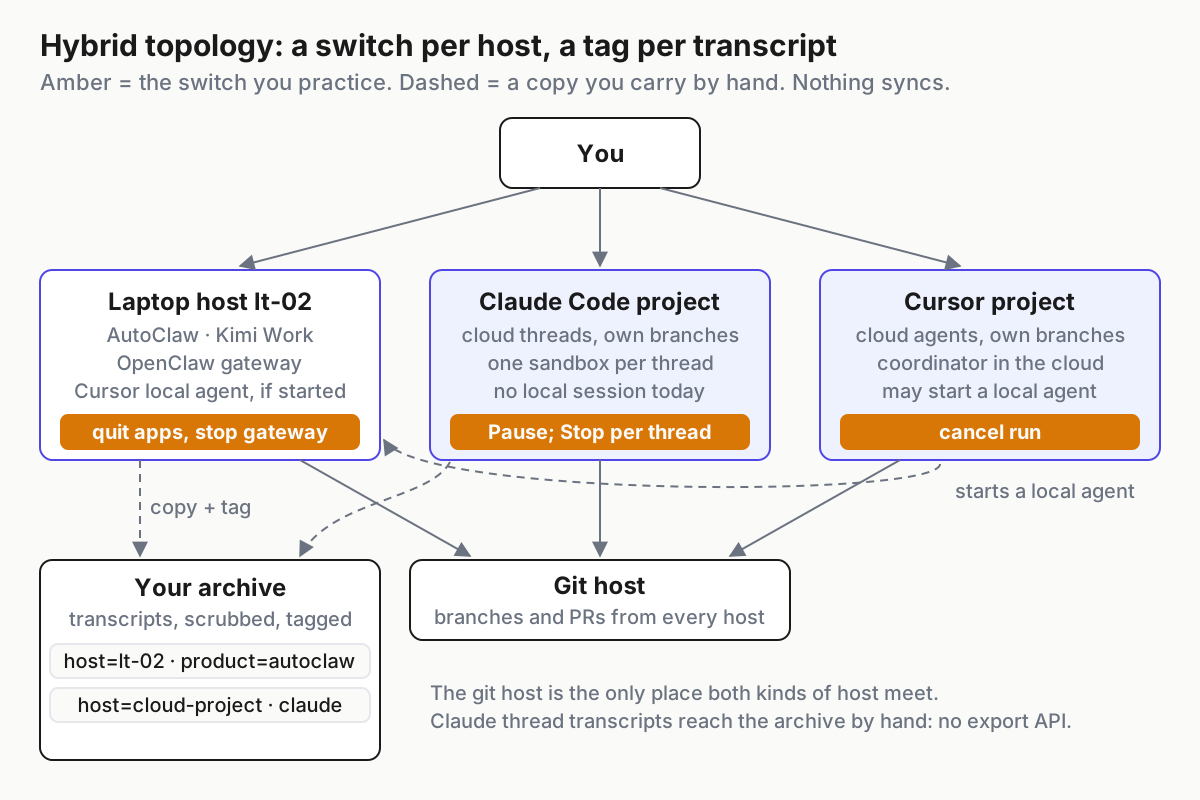 One switch per host, one tag per transcript. The git host is the only place both kinds of host meet.
Step 4: One kill switch per host, with the vendor’s real semantics beside it
The switch is a script or a button you have practiced, and the column that matters is what the vendor actually documents, because that is what you will get at 2 a.m.
| Host | The switch | What the docs say it does | What they do not say |
|---|---|---|---|
| Laptop: AutoClaw | quit the app, or end its process | tasks “keep the device awake during runtime to prevent interruptions” (changelog v1.11.0, Jul 6, 2026), so sleep is not a stop | no abort or kill path for Cluster Mode; no statement about a cluster mid-run when the app closes |
| Laptop: OpenClaw gateway | stop the gateway | it is “the local control plane for sessions, tools, events, and channel connections”; tools “run on the host for the main session unless you configure sandboxing” | whether a downstream packaging inherits these controls |
| Laptop: Kimi Work | quit the app | scheduled tasks “only execute while the app is open”; since 3.2.6 the app asks you to confirm still-running tasks before quitting; 3.2.9 added a “Keep Awake After Screen Off” option, so a dark screen is not a stop | a per-task kill beyond toggling the task off |
| Cloud: Claude Code project | Stop or Esc per thread; Pause for the project | Pause: “Every running thread and the conversation are interrupted, no new threads start, routines don’t run” | whether Stop halts a thread’s subagents; any API or CLI |
| Cloud: Cursor project | cancel the run | “Cancellation is terminal” and the run “cannot be resumed”; the SDK’s cancel is “supported on running local and cloud runs” | a stop for the Project or its coordinator; whether cancelling a coordinator cancels its subagents |
Two consequences. On the laptop, quitting the app is the switch for two of three products, so the switch script is the OS’s, not the vendor’s, and it must also kill the local agent a Cursor coordinator started on that host. In the cloud, Anthropic’s Pause and Archive are the only documented project-wide stops in the roster; everything else is per run or per thread.
Step 5: Approvals stay where the prompt is raised
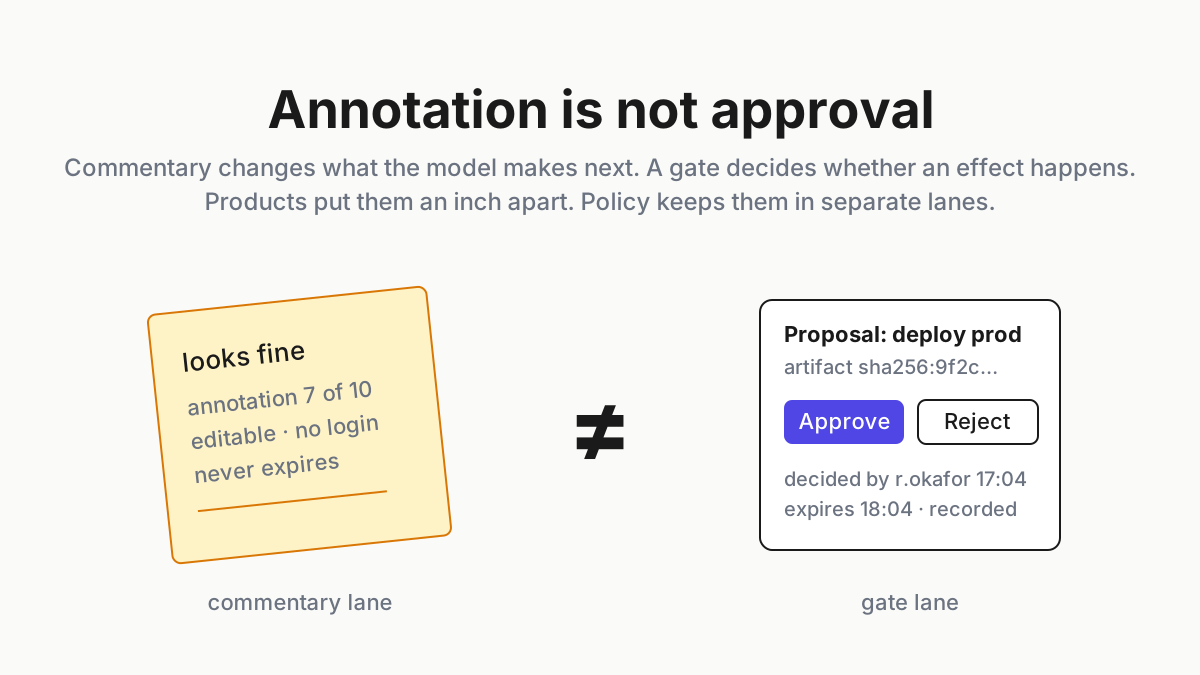
The tempting hybrid move is to approve everything from one place. No vendor supports it. AutoClaw’s Hermes gate is local and explicit: “Every evolution requires your explicit approval.” (AutoClaw Hermes post). Kimi Work has three permission levels, and “When you choose “Manual approval”, nothing happens without your consent.“ A Claude thread’s prompt “is inside that thread and the thread waits until you answer it there”, and answering in the project conversation does not reach it. Cursor documents no permission-prompt model for Projects.
The rule: an approval is answered on the host that raised it, by a human, and logged in the archive with the same provenance header as the transcript. If a product offers a fully automatic mode, treat turning it on as a per-host trust-tier decision, not a convenience setting; Kimi’s own FAQ lists overwritten files and unbootable devices among the outcomes it asks you to accept.
Step 6: Three meters on one page
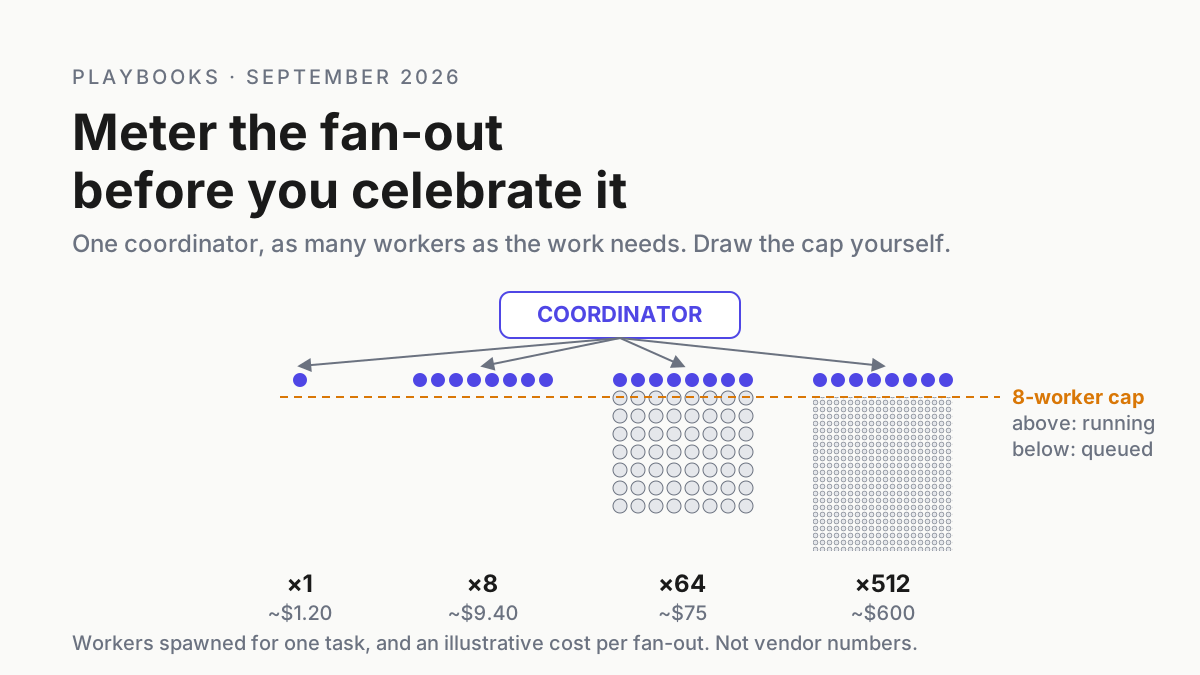
The packaged desktop agents bill in credits, cloud projects bill in plan windows or API dollars, and neither sees the other. AutoClaw offers “free basic usage and daily free credits” with paid plans for heavier use and publishes no exchange rate; a changelog line lets you “Hover to view detailed model consumption statistics”. Kimi’s 3.2.7 notes fixed “an issue where the scheduled tasks page froze when credits ran out”, which suggests credits gate scheduled work. A Claude project counts against your plan and “can reach usage limits faster”, with no separate compute charge, and a thread that hits the limit “waits and continues on its own when the limit resets”. Cursor cloud agents are “charged at API pricing for the selected model” with a spend limit you set at first use (Cursor cloud agents).
Keep one sheet, illustrative, one row per host per day: date, host, product, meter_kind (credits|plan-window|api-usd), amount, note. The join is by date and by principal, never by a vendor’s dashboard, because no vendor dashboard has a row for the other vendor.
Local AI agent vs cloud project failures, and the signal for each
| Failure | The signal | First move |
|---|---|---|
| The laptop slept; the local digital employee did not | AutoClaw’s wake-lock kept the device awake; Kimi’s Keep Awake option was on; the meter climbed overnight | quit the app; decide per product whether unattended runs are allowed on that host |
| A scheduled task silently never ran | Kimi’s missed triggers are “not run retroactively”; the widget shows a stale run in its last 10 | keep the app open on a host meant for it, or move the task to a cloud coordinator on purpose |
| A cloud thread resumed in the next usage window | Monday usage for a Friday project | Pause; then decide whether credits should be on |
| A Cursor coordinator’s local agent outlived your switch | a process on the laptop with a Cursor parent you did not start | add it to the laptop switch; cancel the run from Cursor |
| A transcript with no host | an archive search returns a session you cannot place | mandatory provenance header; tag the orphan unknown-host |
| A Claude project deleted with the transcript unread | the branch and PR remain; the step-by-step record is gone | read and copy before Delete; GitHub is the record of last resort |
The operating layer lives on the laptop and does not pretend otherwise
Chatbots suggest; agents act, and in a hybrid fleet they act on a disk you own and on a computer you do not. Inventory, identity, provenance, a switch per host and a meter joined by date are operating-layer functions no vendor performs for the others, which is why agentic operations is a discipline rather than a product feature.
Automater Lite is a free desktop tray companion for Windows and it sits on exactly one host: the laptop. Its Home cards (Live activity, Session library, Usage) give it fleet awareness of the AI CLIs and desktop sessions installed on that machine, stall flags for the sessions waiting on you, keepalive, a local token meter, vault redaction that scrubs a secret across every stored transcript, and a local Library where sessions are imported, tagged, searched and resumed. Everything it holds is on that disk. There is no cloud sync in Lite; a Claude thread’s transcript or a Cursor run’s events reach that disk only when you copy them home, which is what step 3’s header is for. Lite issues no identities, enforces nothing on AutoClaw or Kimi Work, and cannot see a cloud sandbox. Pro adds managed sessions, so you can start, steer, interrupt and stop agent sessions from the panel, plus pop-outs, diagnostics and the built-in Files, Terminal and Browser; stopping, cancelling and revoking stay free. The tray piece has the full scope. Automater Lite is free on automater.ai; Pro is $50/year.
FAQ: local AI agents and cloud projects
Is a local AI agent safer than a cloud project?
Neither is safer by default; they fail differently. A local digital employee runs shell commands and holds bot tokens on your daily machine, and AutoClaw’s Cluster Mode documents no abort path. A cloud project keeps code in a vendor sandbox but gives you Pause, per-thread Stop and an app installation you can revoke at GitHub.
Can Claude Code Projects run on my laptop?
Not as of Sep 19, 2026. The docs say a local session cannot be part of a project, and threads run in the cloud today. Anthropic’s blog says running on your machine alongside local tools and behind your network is coming very soon, without a date. Cursor’s coordinator already starts a local agent for testing.
Do Kimi Work scheduled tasks run when the app is closed?
No. Kimi’s FAQ says desktop scheduled tasks run locally and only execute while the app is open, and triggers missed while the computer is asleep, shut down or the app is closed are not run retroactively. Since 3.2.6 the app asks you to confirm still-running tasks before quitting.
Sources
- AutoClaw: homepage and FAQ, “What is AutoClaw” (May 29, 2026) and the download page
- AutoClaw: changelog (v1.11.0, Jul 6, 2026; v1.15.3, Aug 4, 2026)
- AutoClaw: privacy policy (effective Mar 25, 2026)
- AutoClaw: multi-agent work-life isolation and Hermes self-evolution (both Jun 1, 2026)
- OpenClaw: repository README
- OpenClaw docs: gateway security
- Kimi Work help: FAQ and overview
- Kimi Work help: release notes and dashboard
- Claude blog: “Projects redesigned: from folder to conversation” (Sep 17, 2026)
- Claude Code docs: “Let Claude coordinate ongoing work with Projects”
- Cursor docs: Projects, cloud agents, Cursor Cloud MCP and the Cloud Agents API; launch post on X, Sep 10, 2026